
I've been using AI coding tools like Cursor, v0, and Lovable, and they have completely transformed how I build software. I have been using them to spin up my landing pages, write code for my whole app - backend, frontend, everything - in a fraction of the time it used to take.
And even though it's fast, the main thing that I realized is that there is a massive catch which comes at the risk of speed.
If you build with Cursor, you’ve definitely been here: you ask the AI to tweak a backend query. It does it perfectly. You deploy. And then three days later, someone points out that your signup button is completely hidden behind a cookie banner on mobile.
Why Does Cursor Break UIs Silently?
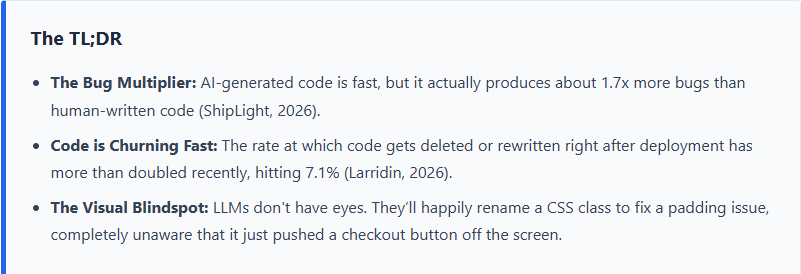
I have noticed that when I use Cursor to modify a file, the LLM looks for the fastest path to fix the code. But LLMs lack visual context. They don't have eyes. They don't know that changing flex-col to flex-row just broke my entire navigation bar. It's no wonder 66% of devs say their biggest frustration is AI output that is "almost right, but not quite" (Uvik, 2026).
Why End-to-End Testing Didn't Work For Me
My first instinct was to write End-to-End (E2E) tests using Cypress or Playwright. I quickly realized that was a nightmare.
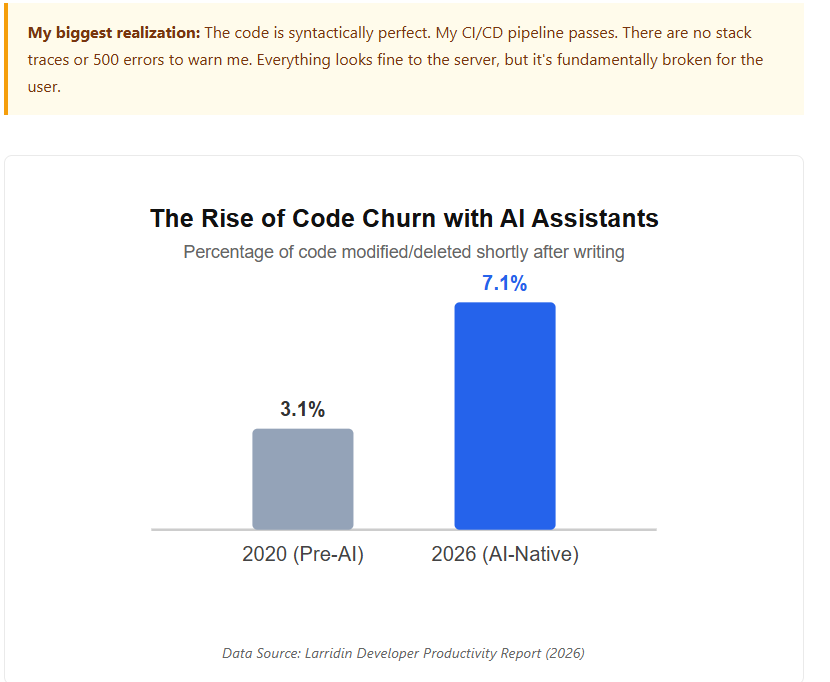
Traditional E2E testing frameworks just don't work when paired with AI coders. Cursor rewrites DOM elements and changes CSS selectors so fluidly that my traditional tests were breaking constantly. I ended up spending more time updating my Playwright selectors than I did writing actual product code. It completely killed the speed advantage I got from using Cursor in the first place.
This not only disrupts my productivity but also introduces a narrow bottleneck from each member of our team who own individual components of the whole build.
How Beryl Fixed It (And How You Can Too)
Our team wanted to keep moving fast with Cursor, but had to stop breaking things in production. We realized we needed a testing tool that understands visuals, not just code.
This is exactly why we built Beryl. The only way to test fluid, AI-generated code was to abandon CSS selectors entirely and test the app the way a human sees it.
Zero Code Setup: Just drop in a URL.
Automated Core Flow Testing: Beryl clicks through critical flows (like logging in or checking out) every single day.
Plain-English Alerts: If something breaks visually, Beryl doesn't send a stack trace. It emails a screenshot and a plain-English explanation: "The Sign Up button is hidden behind the cookie banner."
The best part of this workflow? We can just copy Beryl’s email alert, paste it straight back into Cursor, and the AI fixes the visual bug in one shot. It’s the ultimate feedback loop.
Stop letting your users find your UI bugs.
Beryl is currently running in beta and it's completely free to use. Catch visual regressions before they hit production.
Sources & Citations:
ShipLight, AI Code Quality Index, retrieved 2026-06-29, https://shiplight.ai
Larridin, Developer Productivity & Code Churn, retrieved 2026-06-29, https://larridin.com
Uvik, State of AI Coding Assistants, retrieved 2026-06-29, https://uvik.net